Order Protection [Protect Group]
Order protection
Order protection gives ticket buyers the option to make their booking refundable at the point of purchase. It is built into the Tixly buying flow, powered by Protect Group, and active by default for all venues on the Tixly platform.
If a buyer adds protection and later cannot attend for a covered reason, they apply for a refund directly through Protect Group.
Setting up and managing Order protection
Order protection is active by default at workgroup level. No setup is required to start offering it to your buyers.
It is enabled or disabled on two levels:
Workgroup
Please contact your local Tixly support to enable or disable Order Protection on workgroup level. The order protection setting will apply to all organisations in your workgroup.
Event Date
Go to the event settings and open the Internet+ tab. You can disable Order protection for individual events here without affecting other events in the workgroup. Order protection can also be enabled or disabled using the bulk edit functionality.
If an order includes events with Order Protection turned on and others with it turned off, Order Protection cannot be added to the order. If any event has it turned off, the buyer will not see the option to add Order Protection at checkout.
Online Purchase Flow
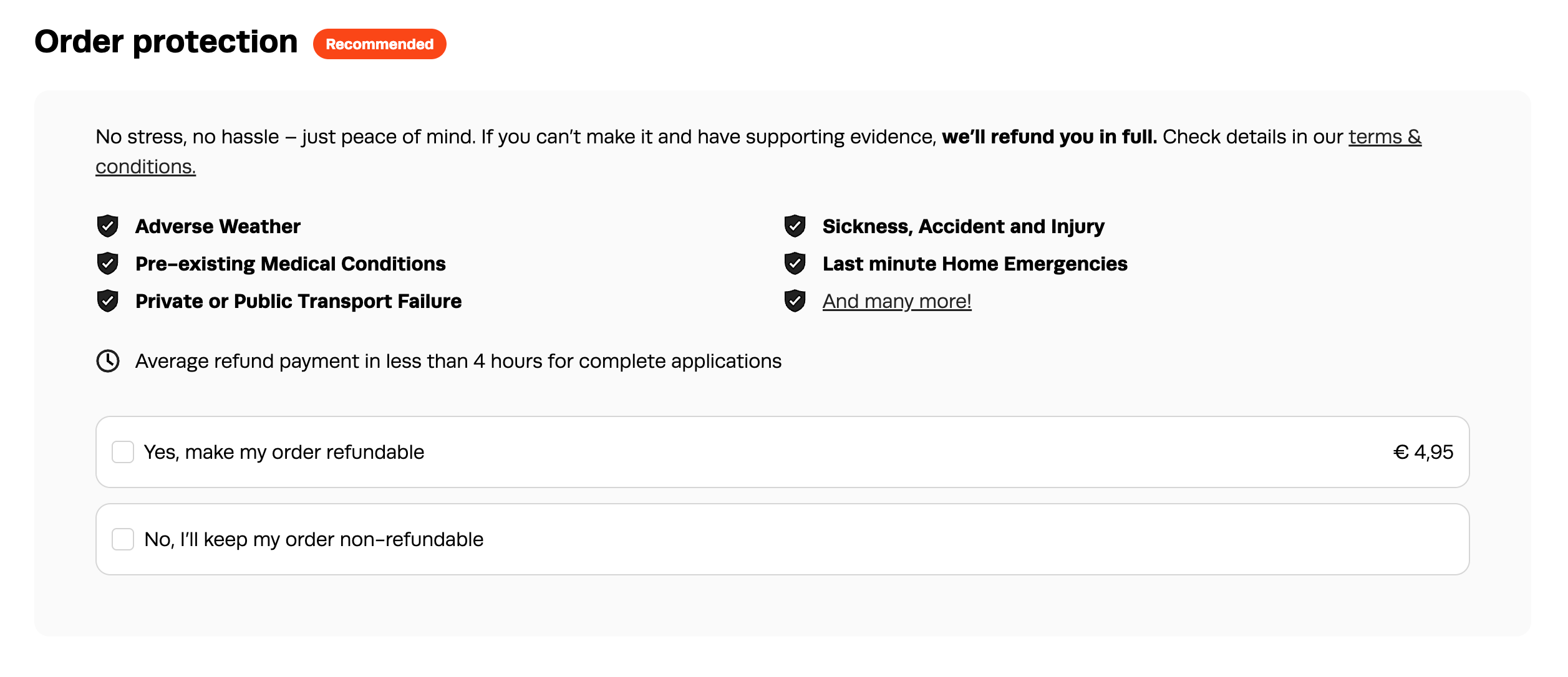
During checkout, buyers see a single, clearly priced option to add Order protection to their order. The fee is a percentage of the overall basket value. The fee is shown upfront before they decide. If a buyer chooses not to add it, they continue through checkout as normal.
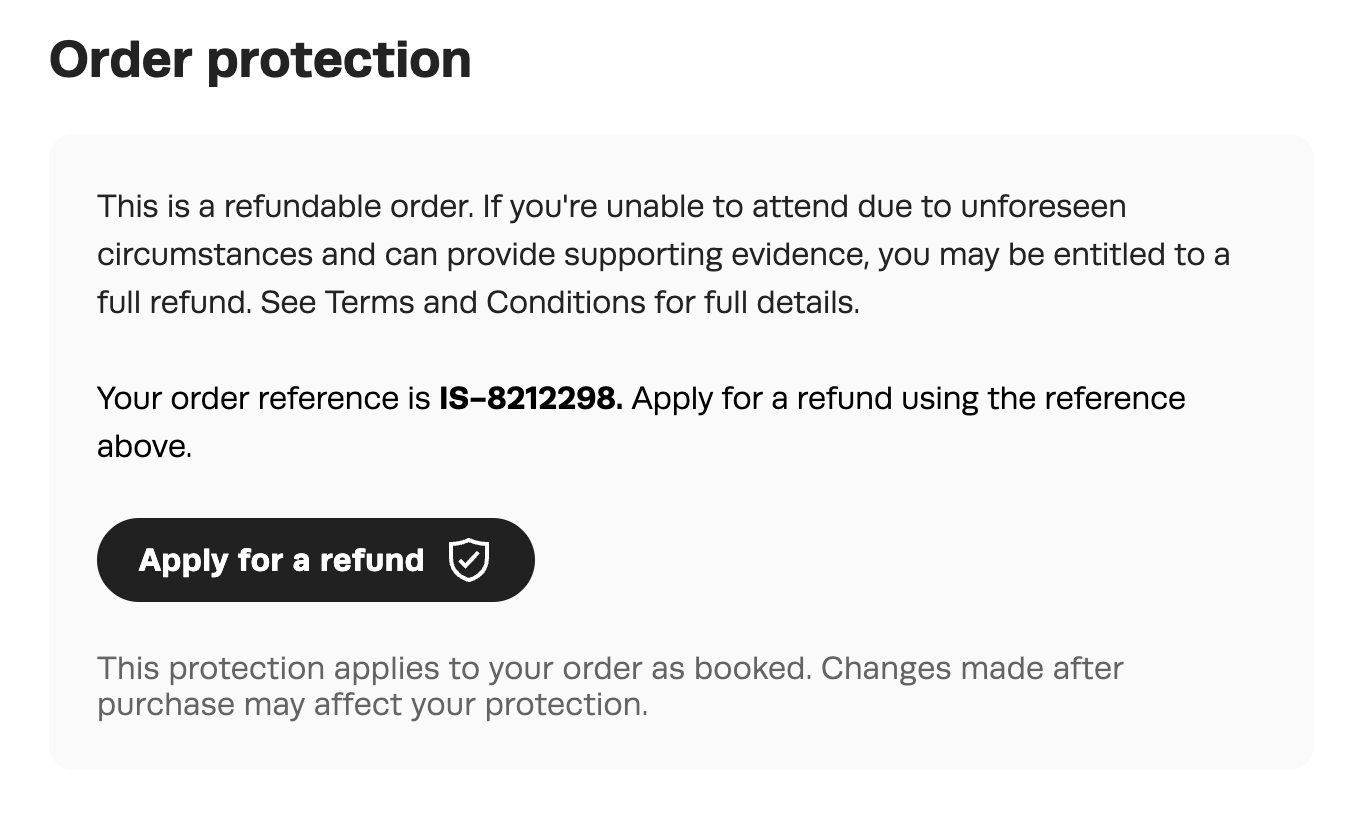
Once an order is confirmed, the buyer's confirmation email and receipt include an Order protection section with a direct link to apply for a refund if needed. No separate communication is sent by Protect Group at the point of purchase.
Box Office Purchase
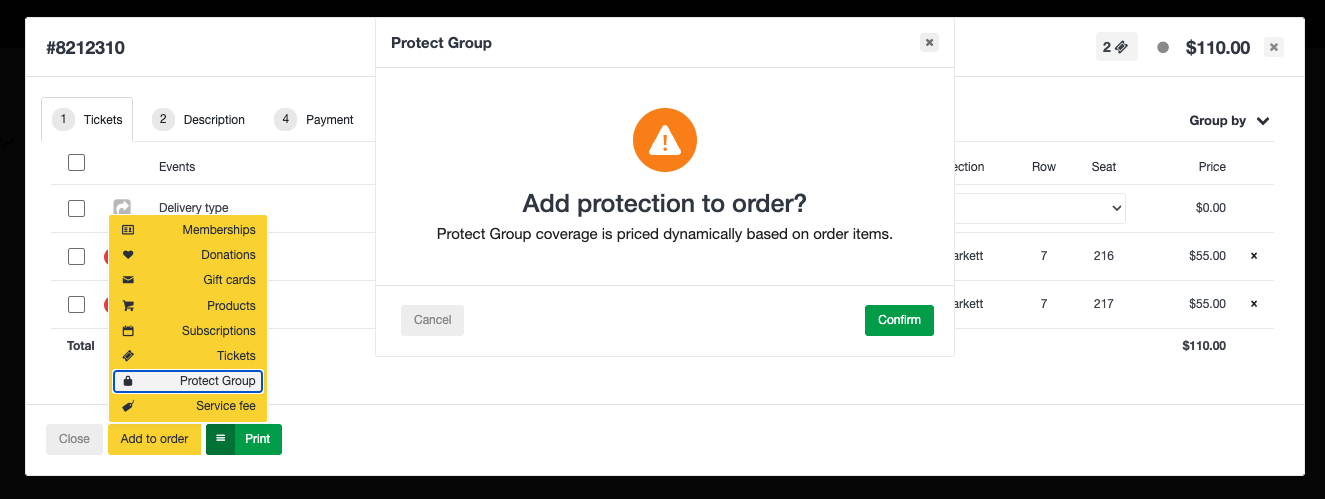
If the items in the reservation are amended after order protection has been added, the protection will be automatically removed. Order protection must then be added to the reservation again before selling the order.
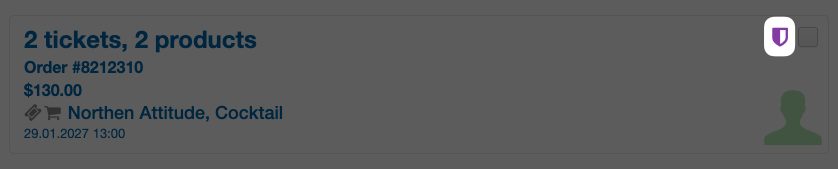
A small shield icon is added to orders containing order protection for quick recognition.
Rules and edge cases
- One protection per order
Order protection covers the entire order, not individual tickets. One protection item is sold per order, regardless of how many tickets the order contains. - Partial refunds
A buyer can request a refund on part of an order. For example, if a group of four booked and one person cannot attend, that person can apply for a refund on their ticket only. The remaining tickets stay valid. - Subscriptions
Order protection is available for fixed subscriptions. If a buyer cannot attend one event within a subscription, Protect Group can process a refund for that individual event without affecting the rest of the subscription. - Forced products and event products
If a ticket includes a forced product, that product is part of the order and is covered by the protection. If a refund is approved, the forced product is refunded along with the ticket. Products sold on events are also included in any approved refund. - Event cancellation
Order protection does not apply when an event is cancelled. If an event is cancelled, any refunds are your responsibility under your standard cancellation policy. It is generally not recommended to refund the protection fee when an event is cancelled. If you choose to do so, be aware that you will be refunding the full protection product value to the buyer - which is more than the 30% share you received from that element of the sale. The suggested customer-facing copy in this article makes this position clear to buyers in advance. - Event reschedule
If an event is rescheduled to a new date, Order protection remains valid for that new date. This happens automatically via Protect Group's API, so a buyer who added protection to the original booking does not need to take any action, and no action is required from your venue or from Tixly. If a buyer cannot attend the rescheduled event for a reason covered by the protection terms, they are still eligible to apply for a refund in the usual way through Protect Group. - Discounted, concession, and early bird tickets
Order protection is available on discounted tickets, including concession pricing and early bird rates. The protection fee is calculated based on the transaction value at the time of purchase. - Vouchers and instalment payments
Orders containing Order Protection may be paid for using gift cards. However, any refund issued will be processed as a monetary refund and will not be returned to a gift card.When an order is paid in instalments, the full Order Protection fee is charged upfront with the first instalment.
Refunding, Deleting, and Exchanging Order Protection
The 14-Day Rule
- 14-day limit: Order protection can be deleted or refunded directly from an order without issue within 14 days of the original sale date. Once 14 days have passed, order protection can no longer be deleted or refunded.
- Refunding order protection: The 14-day rule is applicable only when attempting to manually refund or delete order protection from an order. It does not affect ticket exchanges.
- Auto Refunds: Order protection is never included in Auto Refunds, regardless of when the order was sold.
Box office refund on a protected order
- If a buyer contacts the box office for a refund and has not already submitted an application through Protect Group, you can process a standard refund through Tixly. In this case, the protection fee is not refunded to the buyer. Protect Group is notified automatically and the protection on that order is cancelled.
- If a buyer has already submitted an application through Protect Group, do not process a separate refund through Tixly - contact your local Tixly team for guidance.
Ticket exchanges - Online
Tickets are always retained within the original sale order so that protection follows the ticket. Protect Group quotes are updated directly rather than being generated as new or separate quotes:
- Same or Lower Ticket Price: Results in no change to the Order Protection price, and the tickets remain in the same order.
- Higher Ticket Price: Results in a higher Order Protection price. The additional protection cost is charged alongside any difference in ticket price.
Ticket exchanges - Box Office
When exchanging tickets at the box office, you can now keep the tickets in the same order.
- Same Ticket Price: Tickets can stay in the same order with the same Order Protection price.
- Lower Ticket Price: Tickets can stay in the same order with the same Order Protection Price, with a refund processed to a chosen payment type or Gift Card OR Tickets and Order Protection can be moved to a new order that is overpaid by the difference in the new ticket price. Order Protection remains the same whichever option is chosen.
- Higher Ticket Price: A new reservation is created, and the total amount due includes the difference in ticket price and the increased Order Protection cost.
When tickets are exchanged for new seats or a ticket type is changed, prompting the creation of a new order, associated products are not moved to the new order. In these instances, the order protection will be split, as the remaining products are also covered by the protection.
Claim a Refund
When a buyer needs to apply for a refund, they use the link in their confirmation email or receipt. This takes them to Refundable.me, Protect Group's customer-facing refund portal. The form is personalised and pre-populated with their booking details based on their booking reference.
Online Receipt Page
Email Confirmation

The buyer's steps:
1. Open the refund link and enter their booking reference. Their booking details are auto-populated.
2. Select the reason they were unable to attend.
3. Upload any supporting evidence. The type of evidence required depends on the reason - for example, a doctor's note for illness, a police report for theft, or an employer's letter for redundancy. More detail generally leads to faster approval.
4. Enter their bank details for the refund payout.*
5. Review, accept the terms, and submit.
* Bank details aren't carried over from the original purchase, so buyers need to enter them again as the account the refund should be paid into.
Most applications are assessed and approved automatically. For anything that needs a closer look, Protect Group's customer experience team follows up with the buyer directly within two business days. Average payout time is four hours.
Refund applications can be submitted at any time up to 60 days after the event date.
The box office is not involved in the refund process at any stage. All communication with the buyer is handled by Protect Group.
No ticket is automatically cancelled or modified in Tixly. This behaviour is intentional, ensuring that full control over the released seat is retained by the venue.
If a buyer contacts the box office directly, they should be directed to the refund link included in their confirmation email or receipt. If access to the email is no longer available, the refund form can be accessed directly at form.refundable.me/forms/refund. The booking reference required for the refund request is the Tixly order number.
Do not attempt to process the refund on the buyer's behalf through Tixly unless they have not already submitted an application through Protect Group.
Reporting
Order protection revenue appears in the following places within Tixly:
Cashier report
- Listed under the Other tab, below the sellers list. Also appears in the top-line Other revenue figure.
Order protection report
A dedicated report is available via Reporting > Order Protection.
Contact your local Tixly team to get access to the report.
Finance dimensions
The insurance fee dimension under the Workgroup settings can be used to include finance numbers for the protection revenue in the finance export.
Was this article helpful?
That’s Great!
Thank you for your feedback
Sorry! We couldn't be helpful
Thank you for your feedback
Feedback sent
We appreciate your effort and will try to fix the article