Order Protection [Protect Group] - What is it?
Order protection
Order protection gives your buyers the option to make their booking refundable at the point of purchase. It is built into the Tixly buying flow, powered by Protect Group, and active by default for all venues on the Tixly platform.
If a buyer adds protection and later cannot attend for a covered reason, they apply for a refund directly through Protect Group. Your box office is not involved at any stage.
Order protection is not an insurance product. There are no licensing requirements or regulatory obligations for your venue.
What your buyers see at checkout
During checkout, buyers see a single, clearly priced option to add Order protection to their order. The fee is a percentage of the overall basket value. The fee is shown upfront before they decide. If a buyer chooses not to add it, they continue through checkout as normal.
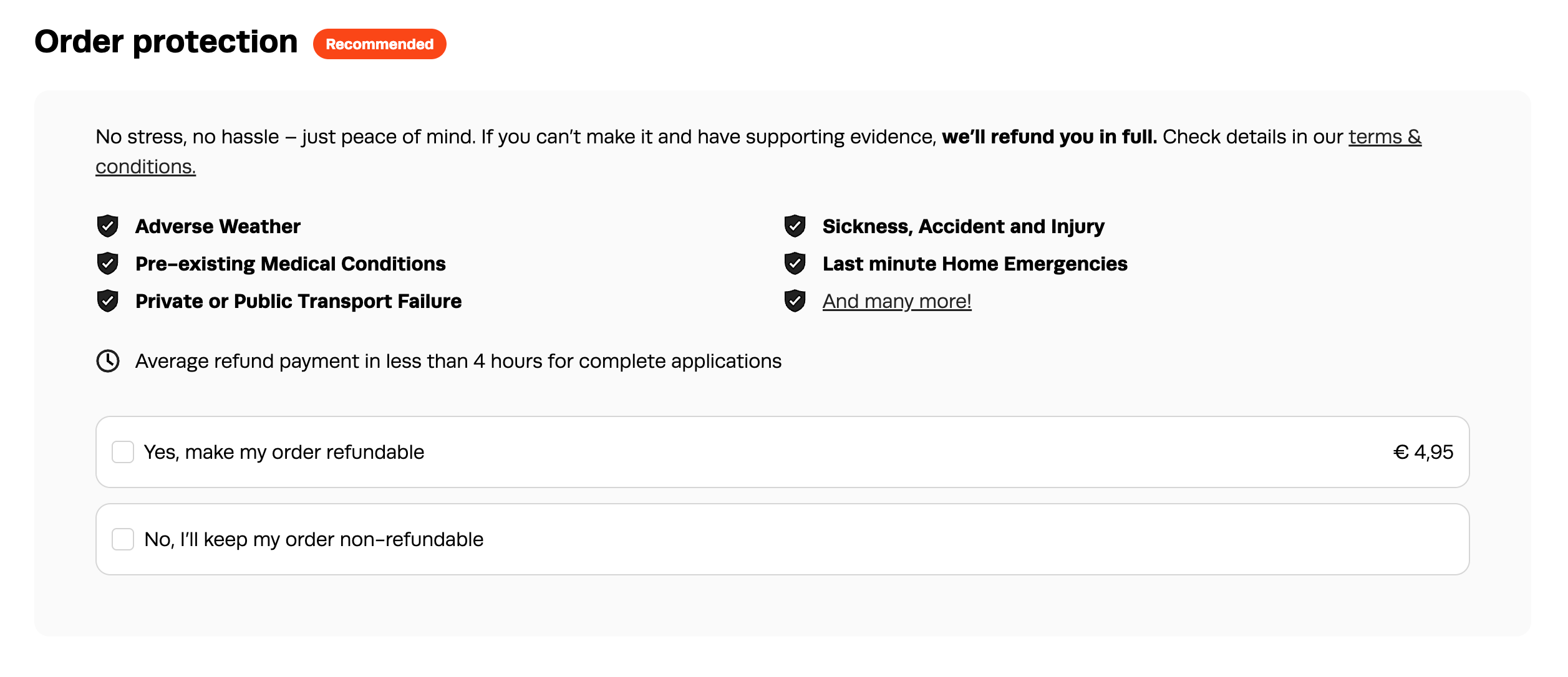
Once an order is confirmed, the buyer's confirmation email and receipt include an Order protection section with a direct link to apply for a refund if needed. No separate communication is sent by Protect Group at the point of purchase.
How the protection fee is priced
The protection fee is calculated using Smart Pricing, which adjusts in real time based on factors including booking value, timing, and demand. These adjustments are extremely small and unlikely to be noticeable to the buyer, but they do mean the fee can vary slightly between transactions. Buyers always see the exact price before opting in, with no hidden charges.
On average, the fee falls between 8% and 12% of the basket total. The exact figure depends on the event, the ticket type, and how far in advance the buyer books. As a general rule, the fee is lower for events with a shorter lead time, and higher the further out from the event date, reflecting the level of risk at that point.
Fixed pricing is available as an alternative to Smart Pricing, but Smart Pricing is the default and the recommended option.
What is covered
Order protection covers the following reasons. Protect Group may ask the buyer to provide evidence relevant to their specific reason - the type of evidence required varies depending on the circumstances. Full details are in the terms and conditions at refundable.me/refund-protect/en.
Illness or injury (including COVID-19)
Pre-existing medical conditions
Pregnancy complications
Death of an immediate family member
Home emergency (burglary, fire, malicious damage, or flood within 48 hours of the event)
Theft of documents
Workplace redundancy
Jury service
Court summons
Public transport failure
Transport breakdown (within 24 hours of the event)
Flight disruption
Armed forces and emergency services recall
Relocated for work
Severe weather (where a government agency has issued a warning not to travel)
Changes to examination dates
Emergency circumstances (considered at Protect Group's discretion)
The emergency circumstances clause means that if a buyer has a genuine reason that does not fit any listed category, Protect Group will still review it on a case-by-case basis. There is no obligation to refund under this clause, but Protect Group's approach is to look for a way to say yes where the reason is genuine and outside the buyer's control.
What is not covered
Order protection does not cover the following:
Change of mind
Booking error (for example, selecting the wrong date)
Event cancellation by the venue (see Event cancellation)
Event postponement by the venue
Communicable disease (as defined by a health authority as a public health emergency - this is a separate exclusion from COVID-19 illness or injury, which is covered)
Any reason that was foreseeable at the time of booking
Heavy traffic or road closures (even where public transport is disrupted)
Normal pregnancy (as distinct from a pregnancy complication)
There is a maximum refund value of $15,000 (or local currency equivalent) per transaction.
Full terms and conditions: refundable.me/refund-protect/en
How the refund process works
When a buyer needs to apply for a refund, they use the link in their confirmation email or receipt. This takes them to Refundable.me, Protect Group's customer-facing refund portal. The form is personalised and pre-populated with their booking details based on their booking reference.
Online Receipt Page
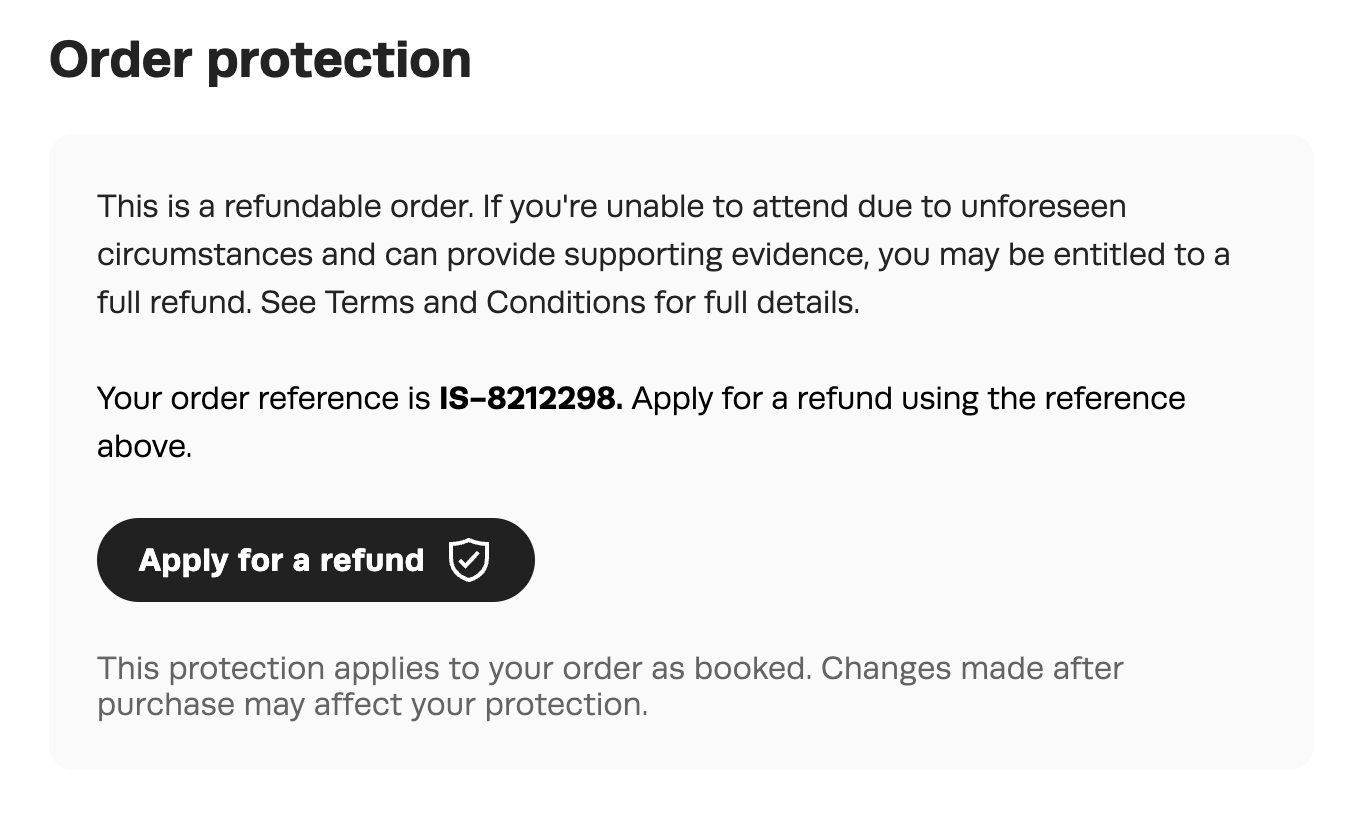
Email Confirmation
 The buyer's steps:
1. Open the refund link and enter their booking reference. Their booking details are auto-populated.
2. Select the reason they were unable to attend.
3. Upload any supporting evidence. The type of evidence required depends on the reason - for example, a doctor's note for illness, a police report for theft, or an employer's letter for redundancy. More detail generally leads to faster approval.
4. Enter their bank details for the refund payout.*
5. Review, accept the terms, and submit.
* Bank details aren't carried over from the original purchase, so buyers need to enter them again as the account the refund should be paid into.
Most applications are assessed and approved automatically. For anything that needs a closer look, Protect Group's customer experience team follows up with the buyer directly within two business days. Average payout time is four hours.
Refund applications can be submitted at any time up to 60 days after the event date.
Your team's involvement
Your box office is not part of the refund process at any point. Protect Group handles all communications with the buyer. When a refund is approved and a seat is released, your venue receives an email notification. You then decide whether to put the ticket back on sale or release it to someone else. Tixly does not automatically cancel or alter the ticket - this is intentional, so your team retains control over what happens to the seat.
If a buyer contacts your box office directly direct them to the refund link in their confirmation email or receipt. If they no longer have access to that email, they can go to form.refundable.me/forms/refund directly. Their booking reference is their Tixly order number.
Do not attempt to process the refund on the buyer's behalf through Tixly unless they have not already submitted an application through Protect Group - see Box office refund on a protected order below.
Revenue and invoicing
Your venue earns 30% of the protection fee on every order where a buyer adds Order protection. This revenue is earned regardless of whether the buyer ever submits a refund application.
The full revenue split is:
| Party | Share |
| Your venue | 30% |
| Tixly | 30% |
| Protect Group | 40% |
Protect Group's share covers the end-to-end operation of the Order Protection programme, including claims handling, payment of approved claims, customer support, technology, compliance, and ongoing programme management.
Your venue automatically retains the remaining 30% of Order Protection revenue. This is additional ancillary revenue that you are free to keep and allocate as you choose, with no operational burden or claims administration.
Invoicing
Tixly will invoice your venue each month for the combined 70% share allocation
You do not need a separate contract with Protect Group.
In your accounts, protection fees collected are recorded as revenue. The 70% invoiced by Tixly is recorded as a cost against that revenue.
Rules and edge cases
One protection per order
Order protection covers the entire order, not individual tickets. One protection item is sold per order, regardless of how many tickets the order contains.
Partial refunds
A buyer can request a refund on part of an order. For example, if a group of four booked and one person cannot attend, that person can apply for a refund on their ticket only. The remaining tickets stay valid.
Subscriptions
Order protection is available for fixed subscriptions. If a buyer cannot attend one event within a subscription, Protect Group can process a refund for that individual event without affecting the rest of the subscription.
Forced products and event products
If a ticket includes a forced product, that product is part of the order and is covered by the protection. If a refund is approved, the forced product is refunded along with the ticket. Products sold on events are also included in any approved refund.
Event cancellation
Order protection does not apply when an event is cancelled. If an event is cancelled, any refunds are your responsibility under your standard cancellation policy.
It is generally not recommended to refund the protection fee when an event is cancelled. If you choose to do so, be aware that you will be refunding the full protection product value to the buyer - which is more than the 30% share you received from that element of the sale. The suggested customer-facing copy in this article makes this position clear to buyers in advance.
Event reschedule
If an event is rescheduled to a new date, Order protection remains valid for that new date. This happens automatically via Protect Group's API, so a buyer who added protection to the original booking does not need to take any action, and no action is required from your venue or from Tixly.
If a buyer cannot attend the rescheduled event for a reason covered by the protection terms, they are still eligible to apply for a refund in the usual way through Protect Group Refundable.me.
To be clear about what this means in Tixly terms: this is not about transferring tickets between buyers, or forwarding tickets through the receipt page. It means the protection coverage itself moves to the rescheduled date. No ticket is moved or reassigned.
Box office refund on a protected order
If a buyer contacts your box office for a refund and has not already submitted an application through Protect Group, you can process a standard refund through Tixly. In this case, the protection fee is not refunded to the buyer. Protect Group is notified automatically and the protection on that order is cancelled.
If a buyer has already submitted an application through Protect Group, do not process a separate refund through Tixly - contact your local Tixly team for guidance.
Cancelling or refunding the protection line item itself
Order protection appears as a separate line item in the order overview, and your box office can technically cancel or refund it. However, this isn't recommended. Protect Group may still charge their fee on a cancelled protection item, so refunding it doesn't necessarily recover that cost.
If a buyer needs a refund on their tickets or products, delete those items and leave the protection line item in place, rather than refunding the protection itself.
Discounted, concession, and early bird tickets
Order protection is available on discounted tickets, including concession pricing and early bird rates. The protection fee is calculated based on the transaction value at the time of purchase.
Vouchers and instalment payments
Orders containing Order Protection may be paid for using gift cards. However, any refund issued will be processed as a monetary refund and will not be returned to a gift card.
When an order is paid in installments, the full Order Protection fee is charged upfront with the first installment.
Suggested copy for your customer-facing pages
If you want to include information about Order protection in your venue's terms and conditions or on a customer-facing page, you can use or adapt the text below. It is written to be clear and accurate for buyers, without technical detail that belongs in internal documentation.
What is Order protection?
Order protection is an optional add-on available during checkout, administered by Protect Group. If you add Order protection to your booking, you may be eligible for a full refund if something unexpected stops you from attending.
What's covered?
Covered reasons include (but are not limited to):
Illness or injury (including COVID-19)
Pre-existing medical conditions
Pregnancy complications
Death of an immediate family member
Home emergency
Theft of documents
Workplace redundancy
Jury service
Court summons
Public transport failure
Transport breakdown
Flight disruption
Armed forces and emergency services recall
Relocated for work
Severe weather
Changes to examination dates
Emergency circumstances (considered at Protect Group's discretion)
Examples of what is not covered: change of mind, booking error, and event cancellation.
Full terms and conditions: refundable.me/refund-protect/en
Additional information
Order protection must be added during the original purchase. It cannot be added retrospectively.
One protection item covers the entire order, regardless of the number of tickets.
Refunds can be requested for part of an order (for example, 1 of 4 tickets). The remaining tickets stay valid.
Refund applications can be submitted up to 60 days after the event date.
If an event is cancelled, Order protection does not apply. In that case, the venue's standard cancellation policy applies.
If an event is rescheduled, Order protection remains valid for the new date.
How to apply for a refund
If you cannot attend for a covered reason, click the refund link in your confirmation email or go to form.refundable.me/forms/refund. Your booking reference is your order number. Refund applications are handled entirely by Protect Group.
FAQs
- Does Order protection affect our existing refund policy?
No. Your venue's own refund terms remain unchanged. Order protection is a separate add-on for buyers who choose it and operates entirely independently of your standard policy. - Is Order protection an insurance product?
No. It is a flexible terms product, which means your venue does not need any licence or regulatory approval to offer it. There are no ongoing regulatory obligations. - Who is the Order protection purchase legally binding between?
The relationship for Order protection is directly between your venue and the buyer. Protect Group administers the product and processes refunds on your behalf, but the legal relationship sits with you and your customer. - Does our venue need a contract with Protect Group?
No formal contract is required. Tixly invoices your venue monthly as part of your regular invoice, which includes Protect Group's share. You can switch the service off at any time, with no long-term commitment. - Can we choose which events offer Order protection?
Yes. Order protection is active by default at workgroup level but can be disabled for individual events in the event settings under Internet+. See Setting up and managing Order protection for full details. - Can a buyer add protection after completing their purchase?
No. Order protection must be added during the original checkout. It cannot be added after the fact. - A buyer has contacted us about a refund. What do we do?
Direct them to the refund link in their confirmation email or to form.refundable.me/forms/refund. Their booking reference is their order number. Protect Group handles all communications and the entire refund process from that point. Your box office does not need to be involved. - What happens to the ticket when a refund is approved?
You keep the original ticket revenue. When Protect Group approves a refund, your venue receives an email notification that the seat has been released. You then decide whether to put it back on sale or release it. The ticket is not automatically cancelled in Tixly. - What currencies are supported?
Protect Group processes refunds in 90+ currencies. If a refund is paid in a currency other than your venue's core invoicing currency, Protect Group covers the foreign exchange fees. - What languages does the checkout widget support?
The Order protection widget currently supports the following languages: Welsh (UK), Danish, German (Switzerland and Germany), English (Canada, UK, and US), Finnish, Faroese, French (Belgium and Switzerland), Icelandic, Norwegian (Bokmål and Nynorsk), Dutch (Belgium and Netherlands), and Swedish (Finland and Sweden). Translation uses a mix of AI and professional services.
If your venue needs support in a language not listed here, contact your local Tixly team to check whether it can be added. - Is there VAT on Order protection revenue?
The VAT can be set to follow the event VAT rate. - Could our venue ever be asked to top up a refund fund?
No. Protect Group's model is not designed to put venues in that position. They are also backed by a protection policy. If an offering becomes unsustainable at a particular venue, Protect Group will discuss pricing or placement changes rather than requesting additional funds from the venue. - How do chargebacks work?
If a valid chargeback occurs on a transaction where Protect Group has already issued a refund, Protect Group will credit the amount to your following month's invoice. Any open refund applications on that order will be closed. - Will offering Order protection conflict with any travel insurance our buyers already have?
No. Order protection is not travel insurance and does not conflict with any existing travel insurance a buyer may hold. Travel insurance typically covers medical costs and travel disruption broadly. Order protection specifically covers the cost of a booking the buyer cannot use. The two products cover different things.
Was this article helpful?
That’s Great!
Thank you for your feedback
Sorry! We couldn't be helpful
Thank you for your feedback
Feedback sent
We appreciate your effort and will try to fix the article